
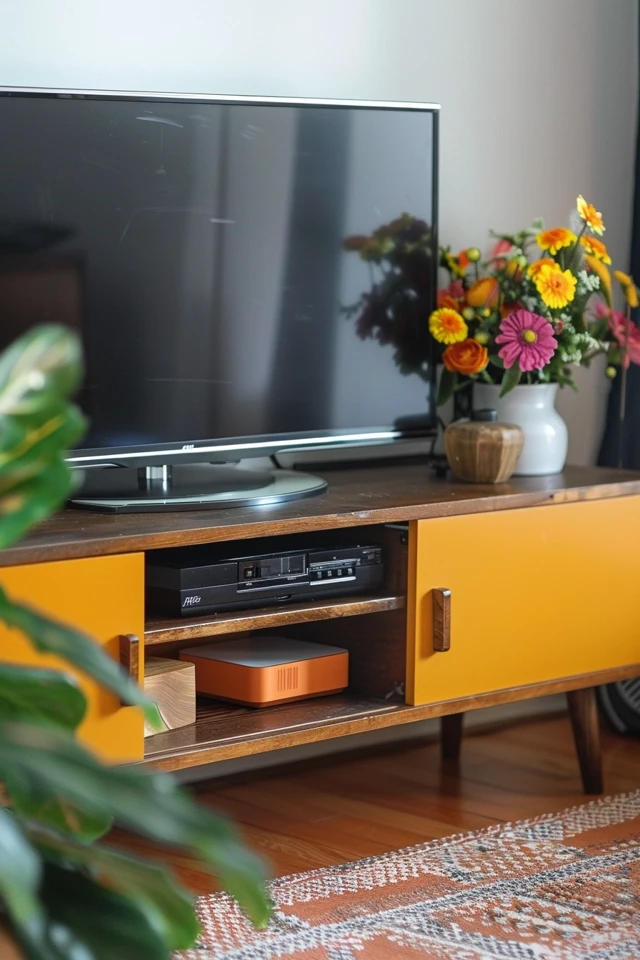
Title: Mid-century Modern TV Stands: Functional Decor
Mid-century Modern TV Stands: Functional Decor
There is often a battle in interior design between the necessary technology of modern life and the desire for a peaceful aesthetic. The television is usually the biggest offender. It is a large black rectangle that dominates the room, often turning a living space into something that feels more like a cinema than a home.
Mid-century modern (MCM) design offers one of the most elegant solutions to this problem. By focusing on clean lines, warm wood tones, and functional storage, these TV stands turn a media center into a focal point of beauty rather than just a utility. I have found that swapping a generic media stand for an MCM credenza is the single fastest way to elevate a living room.
For plenty of real-world examples and inspiration, make sure to look at the Picture Gallery at the end of the blog post.
The Anatomy of Mid-century Design
To choose the right piece, you first need to understand what defines this style. Mid-century modern design originated roughly between the mid-1940s and late 1960s. It was a reaction against the ornate clutter of previous eras.
The most distinct feature of an MCM TV stand is the leg structure. You will almost always see tapered legs, often referred to as “peg legs,” which are angled slightly outward. This isn’t just an aesthetic choice; it serves a crucial spatial function. By raising the bulk of the cabinet off the floor, you expose more square footage of the floor itself. In a small apartment or a narrow living room, this visible floor space tricks the eye into thinking the room is larger than it is.
The silhouette is generally low and long. We call this a “low profile” design. Unlike heavy traditional armoires or vertical entertainment centers, the horizontal orientation of an MCM stand complements the widescreen format of modern televisions. It grounds the technology without overwhelming the vertical space of the wall.
Materiality is the third pillar. Walnut and acorn are the quintessential finishes. These woods have warm, orange, and red undertones that bring life to a space. However, you will also see teak and rosewood in vintage pieces. If you are buying new, you might encounter oak with a darker stain or even painted finishes combined with wood accents.
Mastering Scale and Proportion
As a designer, the most common mistake I see homeowners make is buying a TV stand that is too small for their television. This creates a “top-heavy” look that feels precarious and visually unbalanced.
The Golden Rule of Width: Your TV stand must be wider than your television. I do not mean the screen size (which is measured diagonally); I mean the actual physical width of the TV frame. Ideally, you want at least 6 to 8 inches of surface space on either side of the TV. If your TV is 65 inches diagonally, it is likely about 57 inches wide. Therefore, your stand should be at least 70 to 74 inches wide. This “breathing room” allows the furniture to frame the technology, rather than the technology swallowing the furniture.
Height Matters: Mid-century furniture sits lower than contemporary farmhouse or traditional styles. A typical MCM console is between 22 and 26 inches high. This is actually ergonomically superior for watching TV.
The center of your TV screen should be at eye level when you are seated. For most sofas, your eye level is about 42 inches from the floor. If you buy a tall cabinet (30+ inches) and put a large TV on top, you will be craning your neck. This leads to eye strain and poor posture. The low profile of MCM stands naturally aligns with this ergonomic requirement.
Depth Considerations: Don’t forget the depth. Ensure the stand is deep enough to hold the feet of your TV if you aren’t wall-mounting it. Many modern TVs have wide-set legs. Measure the distance between the TV legs and compare it to the depth and width of the cabinet surface. You generally want a depth of at least 16 to 18 inches to accommodate components and cable management behind the unit.
Functionality: Cables, Airflow, and Storage
A beautiful piece of furniture becomes a burden if it doesn’t work for your lifestyle. When selecting a mid-century stand, you have to look past the pretty wood grain and inspect the “guts” of the unit.
Cable Management:
In my projects, cable management is non-negotiable. Look for units that have pre-drilled holes in the back panel (cutouts). If you fall in love with a vintage credenza that lacks these, you must be willing to use a hole saw to create them. Without these exits, you will have wires draping over the front or sides, which ruins the clean lines of the style.
Ventilation:
Electronics generate heat. Gaming consoles, cable boxes, and receivers need airflow to prevent overheating. Many MCM designs feature slat doors or sliding tambour doors. These are fantastic for ventilation. Solid doors can trap heat. If you have heavy-duty audio equipment, prioritize slats or open shelving in the center section.
Designer’s Note: The Remote Control Dilemma
One specific lesson I learned the hard way involved a client with a full home theater setup. We bought a gorgeous solid walnut sideboard with solid wood sliding doors. It looked perfect. The problem? The solid wood blocked the infrared (IR) signal from the remote control to the cable box inside.
If you have components that require a line of sight, you have three options:
- Choose a unit with open shelving in the center.
- Choose a unit with slatted doors (signals usually pass through the gaps).
- Install an IR repeater system (a small sensor you stick to the TV that relays the signal inside the cabinet).
Mixing Wood Tones and Materials
A frequent anxiety for my clients is “matching” wood tones. They worry that if they have oak floors, they can’t have a walnut TV stand. Let me relieve you of this worry: you absolutely can, and should, mix woods.
A room where every piece of wood matches perfectly looks like a showroom catalog, not a curated home. The trick is to ensure the undertones are complimentary. Most mid-century pieces (walnut/teak/acorn) have warm, orange-red undertones. These generally pair beautifully with lighter oak floors or darker espresso floors because there is enough contrast.
If you are struggling with the mix, use an “insulator.” This is a designer term for placing a rug between the wood floor and the wood furniture. A neutral wool rug or a vintage Kilim creates a visual break. This allows the walnut TV stand to shine without fighting the oak flooring directly.
Marble and Brass Accents:
To break up the “wood box” look, consider MCM stands that incorporate other materials. A white marble top is incredibly durable and adds a touch of brightness. It is also impervious to water rings from drinks. Brass hardware or brass-capped legs (ferrules) add a layer of sophistication and reflect light, which helps break up the visual weight of the wood.
Styling Your Console: The “Rule of Three”
Once you have the stand, you have to style it. The goal is to make the TV feel integrated, not isolated. If you have a 70-inch console and a 50-inch TV, you have space on the sides. Do not leave this empty, but do not clutter it.
The Layout Strategy:
I prefer an asymmetrical arrangement. If the TV is wall-mounted, you have the entire surface to play with. If the TV is on the stand, you are working with the flanks.
I often use the “Rule of Three” for styling surfaces. Group items in odd numbers, as the human eye finds this more pleasing. For a TV stand, this might look like:
1. The TV (the anchor).
2. A tall, sculptural object on one side (like a ceramic vase with dried stems or a slender table lamp).
3. A low, wide stack of books on the other side topped with a small object (like a brass bowl).
Lighting the Space:
Avoid placing a bright table lamp directly next to the screen, as the glare will be distracting. Instead, opt for a small accent lamp with a diffused shade or even an LED strip light attached to the back of the console. This backlighting creates a soft glow against the wall (bias lighting), which reduces eye strain and makes the blacks on your TV screen look deeper.
Common Mistakes + Fixes
Mistake: Blocking the TV sensor.
Fix: When styling with books or vases, ensure they are pushed back or set to the side so they don’t obstruct the bottom bezel of the TV where the IR receiver usually lives.
Mistake: Ignoring the wall space above.
Fix: A TV on a low MCM stand can leave a lot of empty wall space above it. Do not hang art excessively high. Install a floating shelf or a gallery wall that starts roughly 8-10 inches above the top of the TV to bridge the gap.
What I’d Do in a Real Project: A Checklist
If I were designing your living room today, this is the exact workflow I would follow to select and install your TV stand.
1. Measure Everything Twice:
I would measure the wall length. I want the console to take up about 60-70% of the available wall space if possible. A tiny stand on a huge wall looks lost. I would also check the location of outlets.
2. Check the Viewing Height:
I would have you sit on your sofa. I would measure the distance from the floor to your eyes. I would subtract half the height of your TV screen. The resulting number is the ideal height for the top of your TV stand.
3. Select the Storage Configuration:
I would inventory your gear. Do you have a router? A PS5? A collection of vinyl records? I would choose a unit with adjustable internal shelves. Fixed shelves are a nightmare when you try to fit a tall gaming console inside.
4. Plan the Cable Route:
Before pushing the unit against the wall, I would use velcro ties to bundle the cables. I would mount a surge protector to the back of the furniture or the wall, so it sits off the floor. This makes vacuuming easier and keeps the dust bunnies away.
5. Add the “Life” Layer:
Finally, I would add a plant. A snake plant or a ZZ plant in a mid-century planter looks perfect next to a walnut stand. The organic green color pops against the reddish-brown wood and softens the hard technological edge of the TV.
Final Checklist
Before you click “purchase” or head to the vintage store, run through this final list to ensure you aren’t missing a critical detail.
- Width Check: Is the stand at least 6-8 inches wider than the TV frame on each side?
- Depth Check: Is the surface deep enough for the TV legs (if not wall mounting)?
- Height Check: Will the center of the screen align with your eye level when seated?
- Connectivity: Are there cutouts in the back panel for wires?
- Airflow: Will your specific electronics overheat behind solid doors?
- clearance: Is the leg height high enough to clear your baseboards if you want it flush against the wall?
- Safety: If you have toddlers, does the unit come with wall-anchoring hardware? (MCM legs can be tippy if a child climbs on drawers).
FAQs
Can I use a mid-century sideboard as a TV stand?
Yes, absolutely. In fact, I often prefer sideboards because they are longer and offer more storage than dedicated “media consoles.” Just be aware that sideboards are often taller (30-32 inches). This is fine for larger rooms or if you have a taller sofa, but ensure it doesn’t place the TV uncomfortably high. You may also need to drill your own holes for cables.
How do I child-proof a mid-century TV stand?
MCM furniture often has sharp corners and legs that look fun to climb. Anchoring the furniture to the wall is mandatory for safety. For corners, use clear corner guards. Avoid units with easy-to-pull hardware if you have curious toddlers; push-to-open latches are more child-resistant.
What rug size do I need for a media console?
The console does not necessarily need to sit on the rug. However, the rug should anchor the seating area. Ideally, there should be a gap of about 12 to 18 inches of bare floor between the front edge of the TV stand and the edge of your area rug. This highlights the “legged” look of the furniture.
Is solid wood better than veneer for a TV stand?
Not always. Vintage MCM pieces were often made with high-quality veneer over solid wood or plywood substrate. This is very stable and resists warping better than solid planks. However, cheap modern “veneer” is often just a paper sticker over particle board. Look for “wood veneer” specifically. If you buy solid wood, use coasters, as it is more susceptible to water rings.
Conclusion
Choosing a mid-century modern TV stand is about more than just finding a place to park your television. It is a decision to prioritize form alongside function. These pieces bring warmth, history, and architectural interest to a room.
By paying attention to scale, managing your cables, and styling the surface with intention, you can turn the black hole of the television into a design asset. Whether you are in a small apartment or a spacious home, the clean lines and practical storage of this style will serve you well for years to come.
Picture Gallery


