
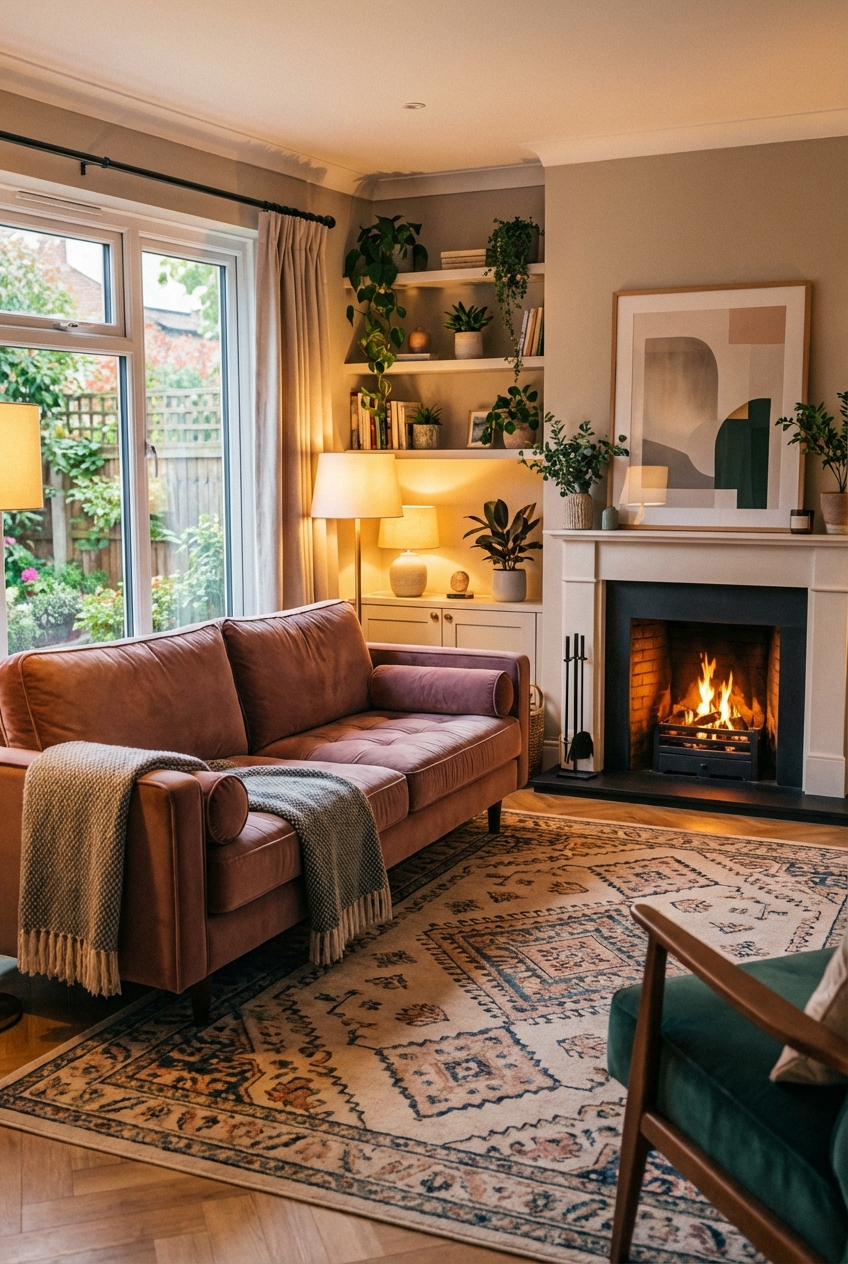
Sims 4 Living Room Ideas for Cozy Spaces
Creating a cozy living room in The Sims 4 is about more than just placing a fireplace and a plush sofa. It requires a deep understanding of how light, texture, and scale work together to create a sense of warmth and invitation. Whether you are building a tiny cottage in Henford-on-Bagley or a modern apartment in San Myshuno, the principles of professional interior design can transform a flat digital space into a home that feels lived-in and loved.
Designing these spaces is a journey through color palettes and furniture arrangements that prioritize comfort over rigid formality. If you are looking for visual inspiration to guide your next build, you can find a curated selection of designs in the Picture Gallery at the end of this blog post. By focusing on the nuances of “clutter” and lighting layers, you can elevate your builds from basic gameplay houses to designer-level masterpieces.
At-a-Glance: Key Takeaways
- Layered Lighting: Never rely on a single ceiling light. Mix floor lamps, table lamps, and candles to create a warm glow.
- Texture Contrast: Combine rough wood with soft velvets or chunky knits to add visual depth to your Sims’ living area.
- The 60-30-10 Rule: Use 60 percent of a dominant color, 30 percent of a secondary color, and 10 percent for accents to keep the room balanced.
- Intentional Clutter: Use the “bb.moveobjects” cheat to place books, mugs, and plants in ways that suggest a Sim just left the room.
- Scale and Flow: Ensure there is at least a one-tile (roughly three feet) path for Sims to walk between furniture pieces to avoid a cramped feel.
What This Style Meaning (and Who It’s For)
A “cozy” living room isn’t a single aesthetic; it is a feeling of being enveloped by your surroundings. In interior design, we often refer to this as “hygge” or “cocooning.” It is a style that favors soft edges over sharp corners and warm tones over sterile whites. It is for the Simmer who wants their home to feel like a sanctuary rather than a showroom.
This approach to design is particularly beneficial for players who enjoy “slice of life” gameplay. If your Sims spend their evenings knitting, reading, or chatting by the fire, their environment should reflect those quiet, intimate moments. It is for the player who values the narrative of a home—the idea that the space has evolved over time with the family living inside it.
For the professional designer, coziness is achieved through “visual weight.” This means selecting pieces that look substantial and comfortable. A thin, spindly chair might look modern, but a deep-seated armchair with a throw blanket draped over the back sends an immediate signal of relaxation and safety.
The Signature Look: Ingredients That Make It Work
To achieve a truly cozy living room in The Sims 4, you need to look past the individual items and focus on the “ingredients” of the atmosphere. The first ingredient is a warm color palette. Think of shades like terracotta, sage green, mustard yellow, and deep navy. These colors recede slightly, making the walls feel like they are “hugging” the room.
Next is the use of natural materials. In the Sims, this means choosing wood swatches that show the grain and stone textures that look matte rather than polished. Avoid high-gloss finishes which can feel cold and clinical. Materials like rattan, jute, and linen (found in packs like Dream Home Decorator or Tiny Living) are essential for adding organic warmth.
Soft furnishings are the heart of the cozy look. You want to layer rugs, even if you already have carpeting. A small, patterned rug placed on top of a larger, neutral one creates an immediate designer touch. Don’t forget the curtains; naked windows can make a room feel unfinished and exposed. Floor-to-ceiling drapes in a soft fabric will instantly soften the architecture of the room.
Layout & Proportions (Designer Rules of Thumb)
In the real world, we use specific measurements to ensure a room is functional. While The Sims 4 uses a grid system, these rules still apply if you want the room to look “right” to the eye. One of the most common mistakes is the “perimeter layout,” where all furniture is pushed against the walls. This creates a dead “dance floor” in the middle and kills the cozy vibe.
Instead, pull your seating closer together to create a conversation pit. The distance between a sofa and a coffee table should ideally be 12 to 18 inches (or about half a Sim-grid square). This keeps things within reach but allows for legroom. If you place the coffee table too far away, the room loses its sense of cohesion.
Rug sizing is another critical factor. A rug should be large enough that at least the front legs of all seating furniture sit on it. In the Sims, if you have a 3×3 seating area, your rug should be at least 4×4 or 5×5. A tiny rug floating in the middle of the floor makes the room feel disjointed. Using the “” and “” keys to resize rugs is a pro-level tip for getting the scale exactly right.
Designer’s Note: I once worked on a project where the client insisted on a massive sectional but had a tiny rug. The room felt like it was “tipping over” visually. In The Sims, this happens often. Always size your rug up rather than down. If the rug is too big, you can tuck the excess under the sofa. It grounds the furniture and defines the living zone within an open-concept floor plan.
Step-by-Step: How to Recreate This Look
- Start with the Anchor: Place your largest piece of furniture first, which is usually the sofa. Position it facing a focal point, like a fireplace or a large window, rather than just the TV.
- Define the Zone: Place your main rug under the sofa. Use the “bb.moveobjects” cheat to slide it exactly where you want it. Ensure it extends past the sides of the sofa to give the room “breathing room.”
- Layer the Seating: Add a secondary chair or a loveseat at a 90-degree angle to the sofa. This creates an “L” shape which is inherently more social and cozy than a straight line.
- Add Surface Areas: Place a coffee table in the center and end tables next to the chairs. These surfaces are essential for “cluttering” later on.
- Build the Lighting: Remove the default ceiling lights. Place a floor lamp in a corner and table lamps on the end tables. In The Sims 4, you can click on lights in Live Mode to change their color and intensity. Set them to a “warm white” or “dim orange” for a fireplace-glow effect.
- Incorporate Greenery: Plants are vital for a cozy space. Use a mix of tall floor plants (like the fiddle-leaf fig from the base game) and smaller potted succulents on shelves.
- The Clutter Phase: This is where the magic happens. Use the “Alt” key to place objects off-grid. Put a book and a coffee mug on the side table. Add a stack of magazines near the sofa. Use the “9” and “0” keys to raise or lower objects onto surfaces that don’t have slots.
Budget Breakdown: Low / Mid / Splurge
In The Sims, your “budget” is often determined by which packs you own or how many Simoleons your household has. Here is how to achieve the cozy look across different price points.
Low Budget (Base Game Only / Starter Home):
Focus on the “Nana’s Old Sofa” and the basic wooden coffee tables. The key here is color coordination. Use the “warm wood” swatches for all furniture to make the mismatched pieces feel like a set. Use the free “Holiday Celebration Pack” for candles and string lights to add ambiance for zero Simoleons.
Mid Budget (A few Game/Stuff Packs):
If you have “Tiny Living” or “Cottage Living,” use the built-in “cluttered” bookshelves and the cozy armchairs. These packs offer textures that look significantly more detailed and “soft.” Use the wall treatments from “Spa Day” for a wood-paneled accent wall that adds instant warmth without costing a fortune in-game.
Splurge (High-End / All DLC):
This is where you use the “Dream Home Decorator” sectional sofas to create a custom wrap-around seating area. Incorporate the high-end fireplaces from “Snowy Escape” and the ornate rugs from “Paranormal.” At this level, you aren’t just placing furniture; you are architectural-layering with built-in shelving units and custom window treatments using the “High School Years” curtains.
Common Mistakes (and How to Fix Them)
The most frequent mistake in Sims living rooms is Over-Lighting. If the room is so bright that you can’t see the shadows in the corners, it won’t feel cozy.
The Fix: Delete your ceiling lights. Use the “Subtle Saucer” light but dim it to 50% intensity and change the color to a soft yellow. Let the lamps do the heavy lifting.
Another mistake is Perfect Symmetry. While symmetry can look “expensive,” it often feels “stiff.”
The Fix: If you have two end tables, put a lamp on one and a plant on the other. Drape a blanket over only one side of the sofa. This “ordered chaos” makes the room feel like humans (or Sims) actually live there.
Lastly, many players ignore the Wall Height. If you are building with tall walls, the space above the furniture can feel cold and empty.
The Fix: Use tall paintings or “wall clusters” (multiple small pictures grouped together) to fill the vertical space. Alternatively, use a wall trim or molding to visually “lower” the ceiling and make the room feel more intimate.
Room-by-Room Variations
Coziness looks different depending on the overall vibe of the house. Here is how to adapt the cozy living room for different themes:
- The Modern Cozy Living Room: Focus on “Soft Minimalism.” Use a neutral palette of creams and greys but bring in warmth through a thick, shaggy rug and a wooden slat accent wall. Keep the clutter minimal but high-quality—one large vase and a single stack of art books.
- The Rustic Cozy Living Room: This is the “Cabin” look. Use stone fireplaces, heavy plaid patterns, and lots of clutter. Think “organized mess”—stacks of firewood, muddy boots by the door, and plenty of knitted blankets.
- The Industrial Cozy Living Room: This might seem like an oxymoron, but you can make brick and metal feel warm. Use “Edison bulb” lighting, leather sofas that look “worn in,” and large indoor trees to soften the hard edges of the industrial architecture.
Finish & Styling Checklist
Before you call your living room “finished,” run through this professional stylist’s checklist to ensure you haven’t missed the details that make a room truly pop.
- Does every seat have access to a surface to put down a drink?
- Are there at least three different light sources at different heights?
- Is there a “touch of black” to ground the room and provide contrast?
- Are the curtains hung “high and wide” to make the windows look larger?
- Is there a mix of at least three textures (e.g., wood, fabric, metal)?
- Can a Sim walk to the sofa without doing a “routing dance”?
- Have you added a “personal” item, like a family photo or a hobby-related object?
What I’d Do in a Real Project
In a real-world design project, I follow a specific hierarchy of needs for a living room. If I were designing your Sim’s house as a professional client, here is my mini-checklist for success:
- Identify the Traffic Patterns: I map out where people walk first. In the Sims, this means ensuring the path to the kitchen or the front door is clear.
- The “Sit Test”: I check the views from every seat. Does the person in the armchair feel left out of the conversation? I would rotate the chairs slightly inward to fix this.
- The Focal Point Check: If the fireplace is the focal point, I don’t let the TV compete with it. I might place the TV on a side wall or above a console table that isn’t the center of attention.
- Material Durability: For a “family” Sim house, I’d choose darker fabrics or “leather” swatches that look like they can handle kids and pets.
FAQs
How do I make a large living room feel cozy?
Large rooms are the hardest to make cozy because they feel “airy.” Break the room into smaller “zones.” Use a large rug to define the main seating area and a smaller rug for a reading nook in the corner. Use room dividers or open bookshelves to create “walls” without completely blocking the light.
What is the best lighting color for a cozy room?
In The Sims 4, the “warm white” setting is your best friend. It mimics the look of incandescent bulbs. Avoid the “cool white” or “blue” tones as they make the room look like a hospital or an office.
How much clutter is too much?
Clutter should be “functional.” Ask yourself: “Would a person put this here?” A mug on a coffee table makes sense; a mug on the floor does not. If the “clutter” prevents Sims from using the furniture, you have gone too far. Always test the room in Live Mode to ensure functionality.
Which Sims 4 pack is best for cozy living rooms?
While subjective, “Dream Home Decorator” is widely considered the best for its versatile sectional sofas and modern-but-warm decor. “Cottage Living” is a close second for those who prefer a more traditional, rustic version of cozy.
Conclusion
Designing a cozy living room in The Sims 4 is an exercise in balance. It is the art of mixing the structured rules of interior design—like scale, lighting, and layout—with the messy, personal touches that make a house feel like a home. By focusing on layered textures, warm lighting, and intentional furniture placement, you can create a space that is as beautiful to look at as it is functional for your Sims to live in.
Remember that design is iterative. Don’t be afraid to move a chair, swap a rug, or change the light intensity until the room “clicks.” The most successful “cozy” rooms are those that feel like they have a story to tell. Now, take these designer rules and go create a sanctuary for your Sims that reflects their unique lives and personalities.
Picture Gallery


